YouTube embeds are heavy. A facade fixes that.
· 3 min read
A YouTube video on a page looks harmless. It's one iframe. But that iframe starts loading the full YouTube player as soon as the page opens, whether anyone presses play or not.
I was reading through Paul Irish's lite-youtube-embed and wanted to understand what it actually changes. This post is my notes.
What a normal embed costsLink to section: What a normal embed costs
The standard embed is an iframe pointing at youtube.com/embed/.... Inside that frame, YouTube loads its player JavaScript, styles, fonts and a few tracking requests. None of it is needed until someone clicks play, and most visitors never do.
Here is a one-second slice of a Chrome performance trace with a normal embed, from the project's README:
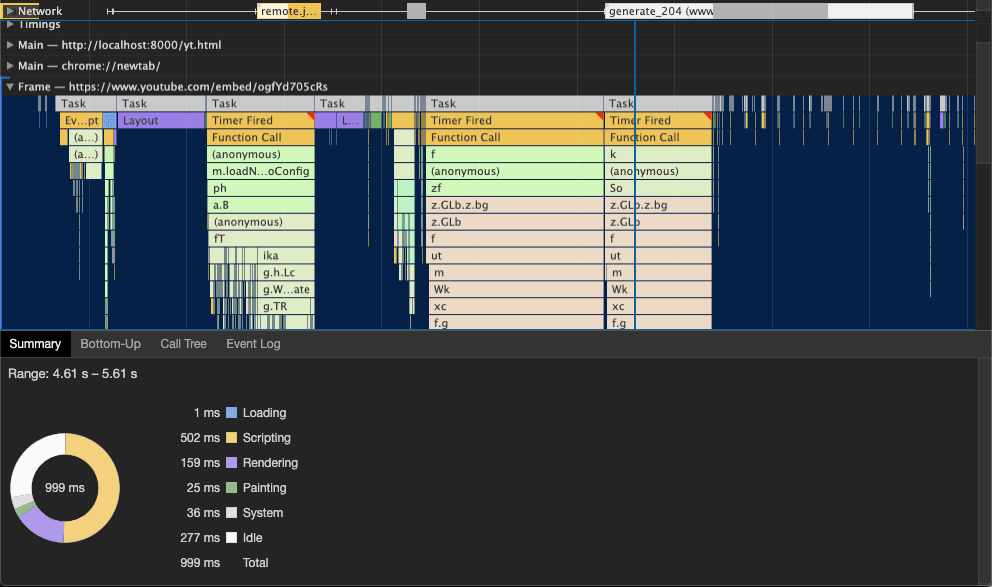
Half of that second goes to running YouTube's JavaScript. The main thread is busy, so if the user tries to scroll or tap something in that window, the page feels slow.
What lite-youtube-embed doesLink to section: What lite-youtube-embed does
It replaces the iframe with a custom element:
<lite-youtube videoid="ogfYd705cRs" playlabel="Play video"></lite-youtube>On load, the element only shows the video's thumbnail and a play button that looks like YouTube's. That's an image and a bit of CSS. When the user moves the pointer over it, it opens connections to YouTube's servers early. When they click, it swaps in the real iframe and the video starts.
This pattern is called a facade. You show something that looks like the heavy component and load the real thing only when someone needs it.
Same slice of the trace, with the facade:
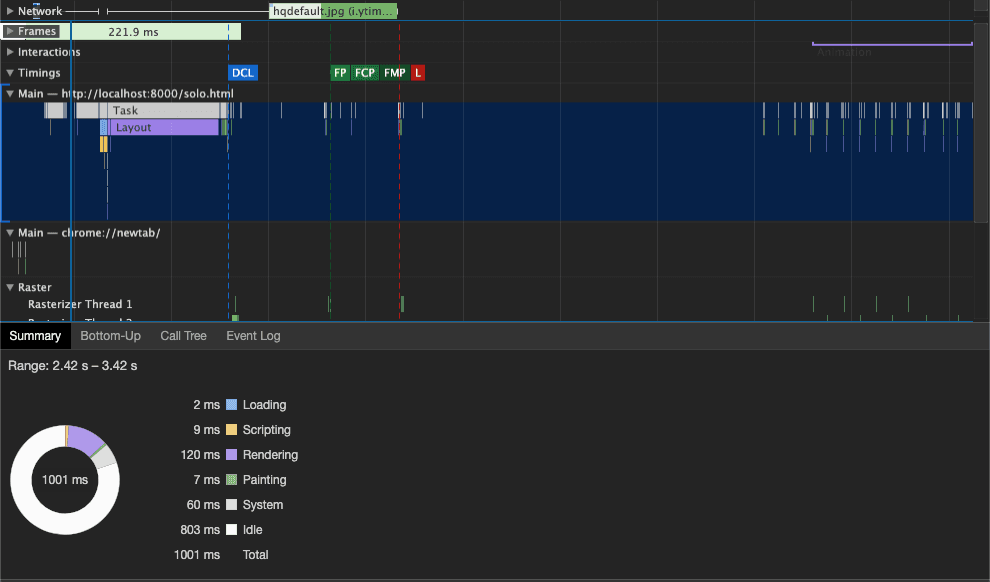
Scripting drops from 502 ms to 9 ms, and the main thread is idle most of the time. The only thing the network panel shows is hqdefault.jpg, the thumbnail.
A couple of other details I liked:
- It uses
youtube-nocookie.com, so YouTube doesn't set cookies until the video plays. - The element can be in the HTML before the script loads. Without JavaScript, you can still link to the video.
The trade-offLink to section: The trade-off
The real player isn't there until the click, so things like autoplay on page load or controlling the player from your own code need extra work. The library has a js-api attribute for the second case. For a video in a blog post or on a landing page, I don't see a downside.
In Next.jsLink to section: In Next.js
You don't need to add the library by hand. @next/third-parties has a YouTubeEmbed component that uses lite-youtube-embed under the hood:
import { YouTubeEmbed } from "@next/third-parties/google";

<YouTubeEmbed videoid="ogfYd705cRs" />;
There are also ports for React and Vue, and the same idea exists for Vimeo and chat widgets like Intercom.
TakeawayLink to section: Takeaway
The interesting part for me isn't YouTube. It's the question behind it: does this third-party thing need to load now, or only when someone uses it? Chat widgets, maps and video players usually fall in the second group. Lighthouse even has an audit for it, "Lazy load third-party resources with facades".
Thanks to Paul Irish for the library and the screenshots.