Trying No-Vary-Search on my own site
· 4 min read
Harry Roberts recently wrote about a new HTTP header called No-Vary-Search in Better Browser Caching with No-Vary-Search. It sounded simple enough that I wanted to try it on this site and see what it actually does. This post is what I found.
The problemLink to section: The problem
Browsers cache pages by their full URL, including the query string. That is correct when a parameter changes the page. ?colour=red and ?colour=blue should not share a cache entry.
It is wasteful when the parameter changes nothing. When I share a link on LinkedIn, it often ends up as gorkemyagci.com/?utm_source=linkedin. The HTML is identical to gorkemyagci.com/, but the browser sees a different URL and treats it as a page it has never seen.
What the header doesLink to section: What the header does
No-Vary-Search is a response header. It tells the browser which query parameters to ignore when it looks for a cached response. The URL does not change, and neither does the request. Only the cache lookup changes.
You can ignore specific parameters:
No-Vary-Search: params=("utm_source" "utm_medium")Or ignore everything except the ones that matter:
No-Vary-Search: params, except=("colour")There is also key-order, which treats ?a=1&b=2 and ?b=2&a=1 as the same URL. One detail that is easy to miss: the list uses spaces between quoted values, not commas.
Adding it to Next.jsLink to section: Adding it to Next.js
This site is a static Next.js app on Vercel. Nothing in it reads searchParams, so tracking parameters can never change a page. That makes it a safe place to try this.
I added the header in next.config.ts:
async headers() {
  return [
    {
      source: "/((?!_next/).*)",
      headers: [
        {
          key: "No-Vary-Search",
          value: 'params=("utm_source" "utm_medium" "utm_campaign" "fbclid" "gclid")',
        },
      ],
    },
  ];
},
The source pattern skips /_next/. Those files already have hashed names and long cache lifetimes, so the header adds nothing there.
Testing itLink to section: Testing it
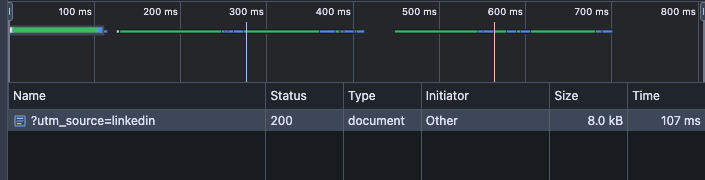
My first test failed, and it was my fault. I had reloaded the page, so Chrome sent cache-control: no-cache with the request and skipped the cache completely. With the cache skipped, the header cannot do anything. The response was a full 200, around 8 kB.
The test that worked:
- Make sure “Disable cache” is off in the Network panel.
- Type
gorkemyagci.comin the address bar and press Enter. - Type
gorkemyagci.com/?utm_source=linkedinand press Enter. Do not reload.
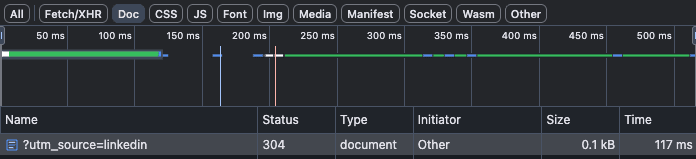
The second request now carried an If-None-Match header with the ETag of the home page. That means Chrome matched the new URL to the cached / entry. The server answered 304 Not Modified, and the transfer dropped from about 8 kB to 0.1 kB.
Why a 304 and not a cache hitLink to section: Why a 304 and not a cache hit
I expected the response to come straight from disk. It did not, and the reason is Vercel's default for HTML:
Cache-Control: public, max-age=0, must-revalidatemax-age=0 means the cached copy is stale immediately, so the browser always has to check with the server first. No-Vary-Search helps it find the right cached copy, but it cannot skip that check. So the request still takes a round trip. What I saved was the download of the page body, not the trip itself.
That is a reasonable default for a site that changes on every deploy. I did not raise max-age just to make this demo look better.
The server already knewLink to section: The server already knew
One more thing I noticed in the response headers: x-vercel-cache: HIT and x-matched-path: /. Vercel's CDN was already serving ?utm_source=linkedin from its cached copy of /. So the server side was never the problem. No-Vary-Search only changes the cache inside the browser.
Should you use it?Link to section: Should you use it?
For a site like mine, the gain is small. On a typical static site, a 304 instead of an 8 kB download will not change how fast anything feels.
It makes more sense on pages with heavy HTML, longer max-age values, or lots of traffic from campaign links. It is also cheap to add, as long as you only ignore parameters that never change the response. If a parameter changes the HTML and you ignore it, people get the wrong page.
Support is still limited. Chrome added it to its HTTP cache in version 141, and the spec is still an IETF draft. I treat it as a small extra, not a caching strategy.
Thanks to Harry Roberts for the original post. It is worth reading in full.