Rendering a streamed LLM answer without freezing the page
· 6 min read
Every AI chat app streams its answer. The text arrives a few characters at a time, and the frontend has to turn that into formatted markdown while it's still coming in.
The simplest version is to keep the text in state and render it with a markdown component. It works. I wanted to know what it costs, so I built a small lab to measure it: streaming-ui-lab.
The setupLink to section: The setup
There is no real model behind it. A fake stream sends a 10,000-character markdown answer (headings, lists, tables, code blocks) 5 characters every 20 ms. Every run gets the same input, and it costs nothing.
The same answer is rendered four ways:
- Naive. Every chunk goes into state.
react-markdownrenders the whole text again. - Throttle. Chunks collect in a ref and state updates every 50 ms. This is what
useChat({ throttle: 50 })does in the AI SDK. - Memoize. The text is split into blocks on blank lines (never inside a code fence). Each block is a
React.memocomponent, so finished blocks don't render again. Only the last one does. - Streamdown. Vercel's package for streaming markdown, which also memoizes blocks.
The page measures itself while it streams, so you don't need DevTools open:
- Commits and render time, from React's
Profiler. - Total blocking time, from the Long Animation Frames API. How long the page was frozen.
- Input delay, from the Event Timing API, while I type into a text field during the stream.
- FPS, from a
requestAnimationFramecounter.
React Compiler is off. With it on, the naive version would get memoized automatically and stop being naive.
On a fast laptopLink to section: On a fast laptop
Three runs per mode, averaged:
| Mode | Commits | Render total | Blocking time | FPS (avg / min) |
|---|---|---|---|---|
| Naive | 1969 | 14.6 s | 16 ms | 60 / 58 |
| Throttle | 789 | 9.0 s | 0 ms | 60 / 59 |
| Memoize | 1969 | 4.3 s | 0 ms | 60 / 60 |
| Streamdown | 2592 | 6.3 s | 0 ms | 60 / 60 |
Memoize does a third of the work of naive. But look at the last two columns. The page never freezes and stays at 60 FPS in every mode. On my machine, a user would not notice any difference.
With the CPU slowed down 4xLink to section: With the CPU slowed down 4x
Then I turned on 4x CPU slowdown in DevTools, which is closer to a mid-range phone:
| Mode | Render total | Blocking time | Worst input event | FPS (avg / min) | Time to show the full answer |
|---|---|---|---|---|---|
| Naive | 147.3 s | 68.9 s | 232 ms | 21 / 6 | 168.6 s |
| Throttle | 125.5 s | 61.1 s | 72 ms | 23 / 6 | 148.5 s |
| Memoize | 20.2 s | 1 ms | 64 ms | 60 / 59 | 39.8 s |
| Streamdown | 49.0 s | 0.6 s | 96 ms | 46 / 4 | 64.3 s |
The naive version falls apart. The page is frozen for 69 seconds in total, FPS drops to 6, and a keystroke takes 232 ms to show up, above the 200 ms that INP calls "good".
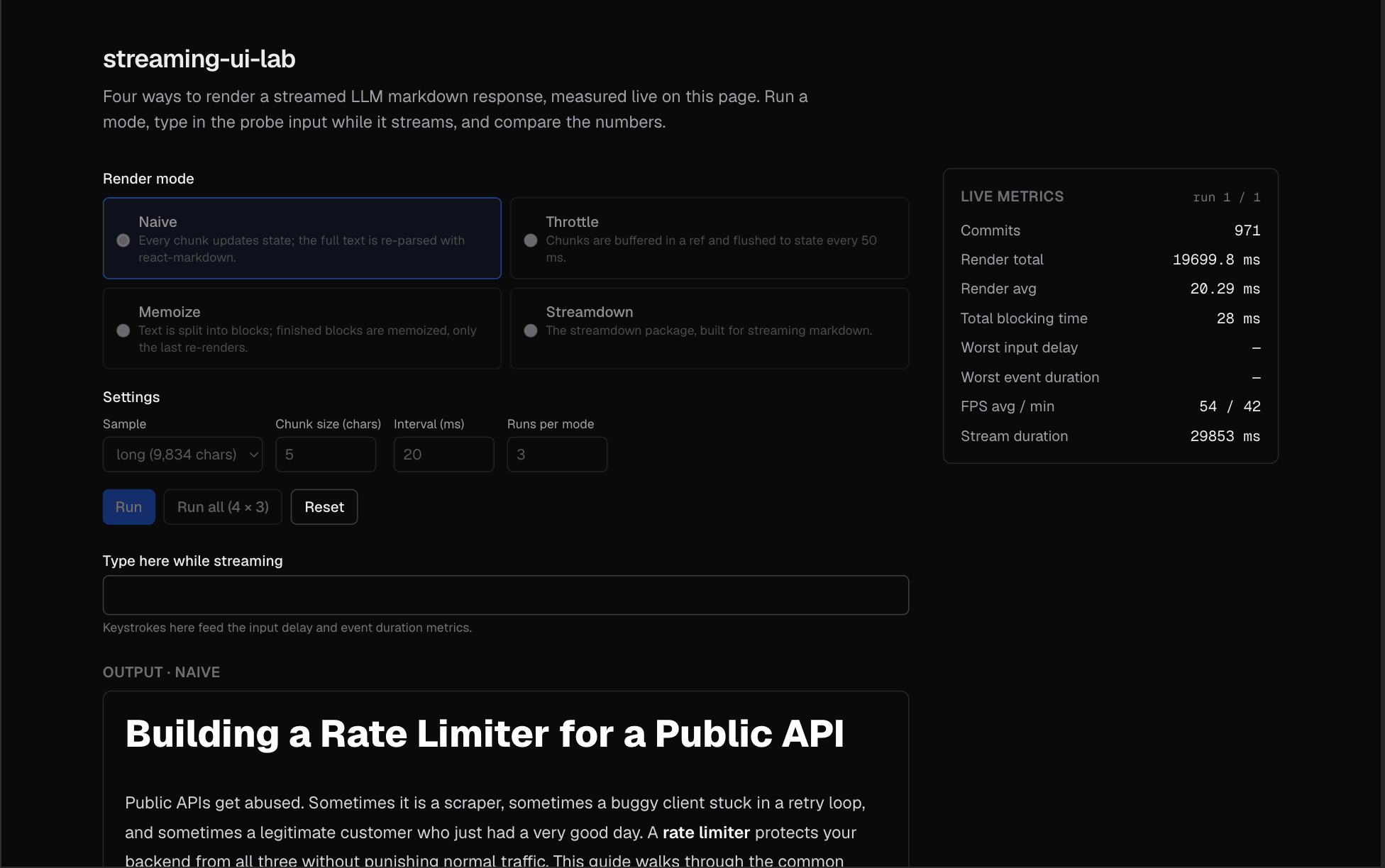
The last column needs a note. The answer takes 39 seconds to stream, but the naive version needs 168 seconds to show all of it. My fake stream runs on the same main thread, so it slows down too. With a real API the stream wouldn't slow down. The text would pile up and the screen would fall further and further behind the model.
React also started logging "Maximum update depth exceeded" in the naive mode. The AI SDK has a troubleshooting page for exactly this error, so it isn't just my demo.
Memoize barely notices the slowdown. Same 39.8 seconds as the stream, 60 FPS, 1 ms of blocking.
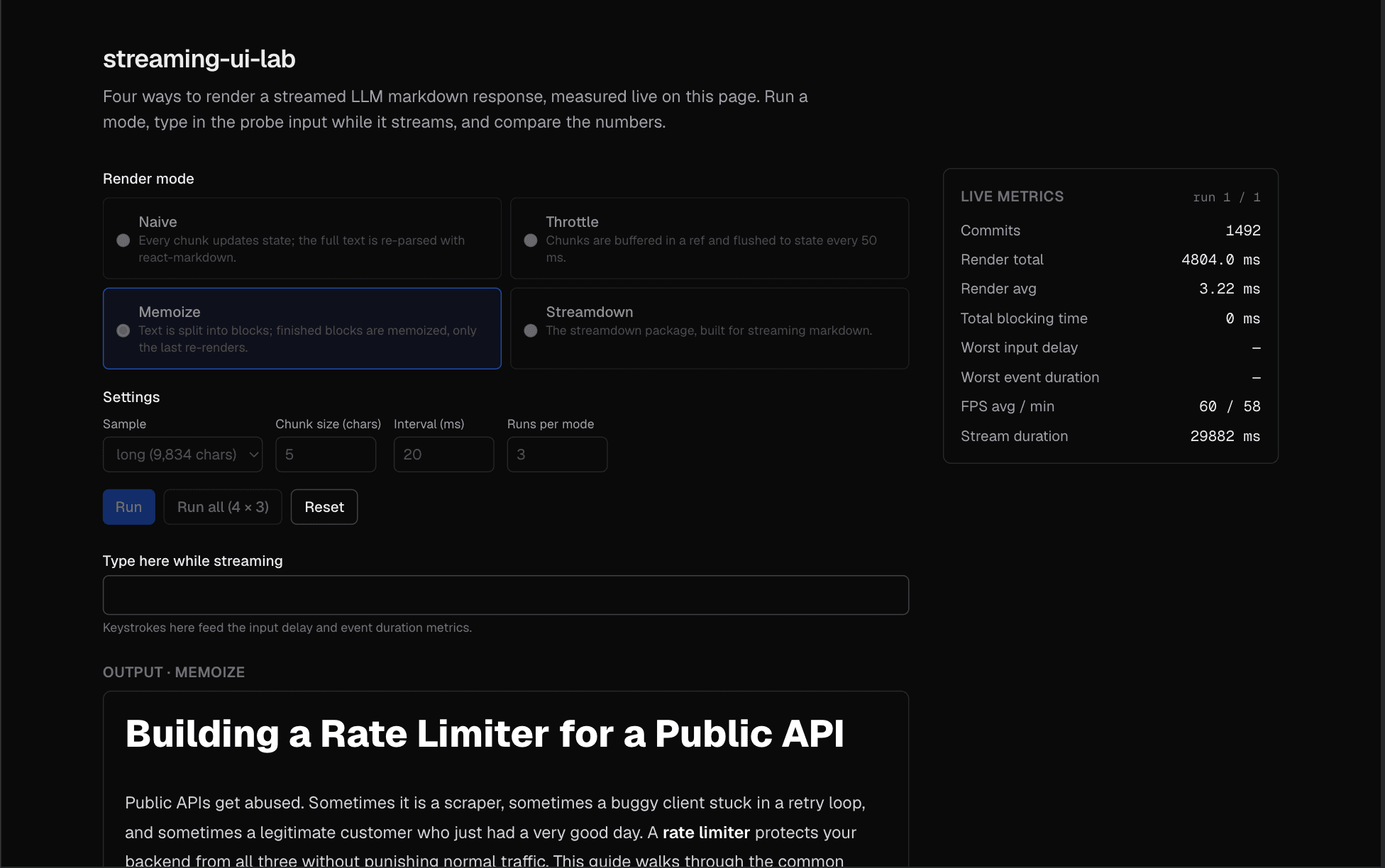
Compare the commit counts in the two screenshots. Each commit is one chunk on the screen. After the same 30 seconds, naive has shown 971 chunks and memoize 1492. Naive is already a third of the way behind, and it has spent four times as long rendering to get there.
Why throttling isn't enoughLink to section: Why throttling isn't enough
Throttle is the usual advice, and it does help a little: fewer commits, and typing feels better. But the page still freezes almost as long as naive.
Each update is cheaper only in count, not in size. Every time state changes, react-markdown still parses the whole answer from the first character. A 10,000-character answer gets parsed hundreds of times. Throttling lowers how often you pay that cost. It doesn't make the cost smaller.
Memoize changes the cost itself. A finished paragraph's string never changes, so React.memo skips it. Each update only parses the block that is still being written, which is a few hundred characters at most.
The core of it is small:
const MemoBlock = memo(function MemoBlock({ content }: { content: string }) {
  return <Markdown>{content}</Markdown>;
});

export function MemoizeRenderer({ text }: { text: string }) {
  return splitBlocks(text).map((block, i) => <MemoBlock key={i} content={block} />);
}
splitBlocks is the only careful part. It must not split inside a code block, even one that contains blank lines.
StreamdownLink to section: Streamdown
I expected Streamdown to match my memoize version, since it uses the same idea. It was slower, and FPS dipped to 4 at the worst point. Streamdown also does things my version doesn't, like fixing half-finished markdown while it streams and hardening links. My guess is that this extra work is the difference, but I haven't profiled it in detail.
For most apps it's still the easier choice. You get the memoization, plus those fixes, without writing a block splitter yourself.
Screen readersLink to section: Screen readers
One more thing that's easy to miss. If the output is an aria-live region, a screen reader tries to announce every chunk, and the answer becomes noise.
The lab puts the output in role="log" with aria-live="off", so it is not announced while it streams. A separate, visually hidden role="status" element says "Response streaming" and then "Response ready". The user hears the state once and reads the answer when it's done.
What I took from itLink to section: What I took from it
- On a fast laptop, rendering the whole answer on every chunk looks fine. Test with CPU slowdown before deciding it is.
- Throttling cuts the number of renders, not the cost of each one.
- Splitting the answer into memoized blocks fixed it, with a few lines of code.
These numbers come from development mode, so the absolute values are higher than in production. The gap between the modes is what matters, and it's large enough that I don't expect it to close.
The code is on GitHub and you can run the lab yourself at streaming-ui-lab.vercel.app.